Best Mini PC for Home Assistant UK 2026
The best mini PCs for running Home Assistant in 2026: Beelink, Minisforum, GMKtec, and entry-level N100 picks across the £150-£600 UK price range.
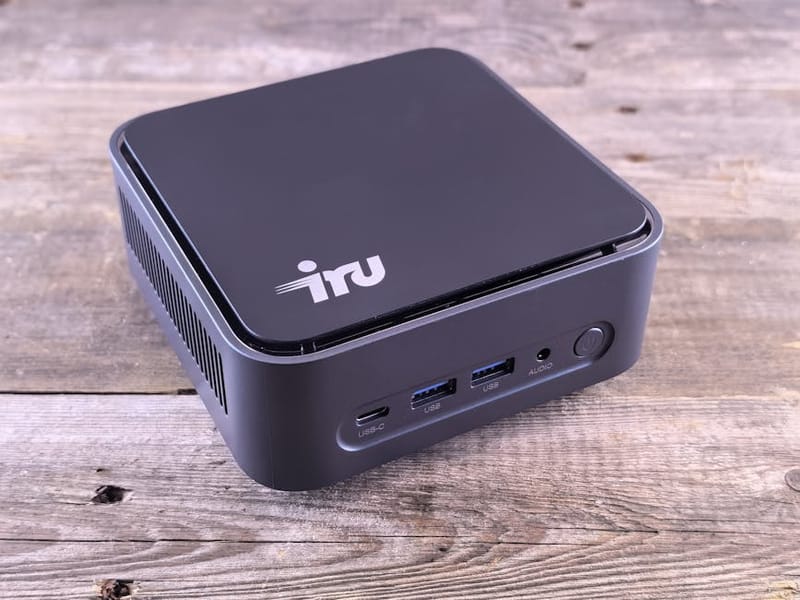

Since Intel killed the NUC product line in 2023 the Chinese mini-PC market has stepped up substantially. Beelink, Minisforum, and GMKtec now make boxes that are quieter, more powerful, and significantly cheaper per spec than the NUCs they replaced. For running Home Assistant, the open-source smart home automation platform, in 2026, the entry-level Intel N100 boxes are the new sensible default - and the higher-tier picks are genuinely strong for whole-home automation hubs.
This guide groups four price tiers (£150, £200, £350, £600+) and picks the strongest UK option in each. The big change from 2024: the £150 N100 boxes are now good enough that 90% of UK Home Assistant, a UK-specific Home Assistant configuration, users do not need to spend more.
What should a 2026 Home Assistant mini PC actually do?
Three workload tiers map cleanly to the mini-PC tiers in this guide.
- Light: Home Assistant OS + 10-30 devices + 5-10 add-ons (ESPHome, Mosquitto, Node-RED, Z-Wave JS, Zigbee2MQTT, etc.). 4 GB RAM is enough. The entry-level N100 boxes handle this with idle CPU.
- Medium: Add Frigate with 2-4 cameras (object detection at 5-15 FPS), Plex / Jellyfin for one stream, or 2-3 small Docker containers. 8-16 GB RAM. Intel N100 still works for this but a Ryzen 5 box is more comfortable.
- Heavy: Frigate with 4-8 cameras at 15+ FPS, Coral USB, the Google Coral USB AI accelerator stick for running ML models on edge devices, or built-in iGPU for inference, Proxmox running HAOS + Frigate + Nextcloud + Adguard + Jellyfin LXC containers, multiple Docker stacks. 32 GB RAM, modern Ryzen 7 or i7. This is homelab territory.
Be honest about which tier you actually need. Most UK households running Home Assistant fall into Light - and over-spec'd hardware sits idle drawing more standby power than it should.
Best entry-level (£150-£200): Intel N100 boxes
The GMKtec NucBox K8 (£150-£180) and Beelink EQ12, the Beelink budget Mini PC popular for self-hosting smart home software, (£170-£200) are the sensible UK defaults for new Home Assistant installs. Both run Intel N100, both ship with 16 GB DDR4 and 500 GB NVMe, both have dual 2.5 GbE, both idle at 6-8 W. Fanless or near-fanless. Linux compatibility is excellent because the N100 is the most-tested CPU on the market right now.
For pure HAOS use, install HAOS directly on the NVMe (HAOS 14 has a native generic-x86-64 installer) and you are done. For Proxmox flexibility, install Proxmox on the NVMe and run HAOS as a VM with USB passthrough for Z-Wave / Zigbee sticks. Either approach works on this hardware.
Best mid-tier (£250-£400): Ryzen 5 + Intel iGPU options
Beelink SER5 Max (£280-£320) with Ryzen 7 5800H and 16 GB RAM is the value pick at this tier. Minisforum UM870 (£350-£400) with Ryzen 7 7840HS is faster but pricier. Both can comfortably handle HAOS + Frigate + 2-3 LXC containers + Proxmox.
The key reason to step up from N100 territory is Frigate. Hardware-accelerated object detection (via Coral USB or the integrated GPU) is materially better on Ryzen-based boxes - 2-4 cameras at 10-15 FPS is comfortable; 6+ cameras start to push the box.
Power draw moves up too. N100 idles at 6-8 W; the Ryzen 5/7 boxes idle at 12-18 W. Over a year at UK 2026 electricity prices (~28p/kWh), that is roughly £30-40 difference. Not trivial for an always-on box.
Best high-tier (£500+): Beelink EQR6, Minisforum MS-01
Beelink EQR6 (£550-£650) with Ryzen 7 8845HS and 32 GB RAM is the practical homelab pick - dual 2.5 GbE, USB 4, modern Ryzen with strong iGPU. Minisforum MS-01 (£650-£750) is the enthusiast pick with 10 GbE + dual 2.5 GbE + dual M.2 + a PCIe slot for expansion.
Both make sense if you are genuinely heading toward homelab territory - multiple Proxmox VMs, NAS-adjacent storage, multi-camera Frigate with object recognition at high frame rates, self-hosted everything. Both are overkill for HAOS alone.
Honest disclosure: the £500+ tier is where the value-for-money story breaks down. Two cheaper boxes (separate HAOS box + separate Frigate box) can sometimes give you better resilience for the same money. Make sure you actually need the consolidation before paying the premium.
What about power draw over a year?
UK 2026 electricity prices are ~28p per kWh. A box that idles at 8 W draws 70 kWh per year = ~£20. A box that idles at 18 W draws 158 kWh per year = ~£44. The lifetime delta over 5 years (£100-£120) is meaningful relative to the £50-£200 hardware-price gap between tiers.
The practical implication: the entry-level N100 boxes save you money on electricity over their lifetime, not just on purchase. The Ryzen mid-tier costs more both upfront and over time. The high-tier doubles down on that trade-off. If power consciousness matters to you, the N100 is genuinely the right pick.
Fanless vs near-fanless: does it matter?
For a HAOS box sitting in a hallway cupboard, yes. The GMKtec NucBox K8 is one of the few mini PCs that is genuinely fanless in this price range. The Beelink EQ12 has a fan but it spins down to silence under HAOS-typical loads. The Ryzen-based mid-tier boxes all have fans that you will hear in a quiet room.
If the box lives in a server cupboard or under stairs, the fan noise does not matter. If it sits visibly in the kitchen or living room, prioritise the fanless or near-fanless options.
What about Coral USB and AI accelerators?
The Google Coral USB Accelerator (~£70) is the historical answer for Frigate object detection without a strong GPU. It still works in 2026 but the maths have shifted - modern Intel N100 iGPU (HWA) and Ryzen iGPUs do enough on their own that the Coral is less essential than it was.
Practically: stick a Coral USB on an N100 box if you want to push 4+ cameras at 15+ FPS with object detection. Skip it if you have 1-2 cameras or if you bought a Ryzen mid-tier box (the iGPU is fast enough). Avoid building a setup around old Pi + Coral combinations - the value-for-money is worse than a £150 N100 alone.
What software stack should you run?
Two main paths.
Home Assistant OS (HAOS) direct install on the NVMe is the simplest. The HAOS 14 generic-x86-64 image installs cleanly on all the boxes mentioned above. You get the supervisor, add-on store, easy updates, no Proxmox layer to maintain. The downside is you cannot run anything else (Frigate as standalone, Nextcloud, etc.) on the same box.
Proxmox VE + HAOS as a VM is the flexible default once you have other things to run. Install Proxmox on the NVMe, create a HAOS VM (the community helper scripts at community-scripts.github.io/ProxmoxVE/ automate this), pass through USB Z-Wave / Zigbee dongles, run Frigate / Plex / Adguard as LXC containers alongside. Slightly more setup; much more flexible.
For the entry-level N100 boxes, HAOS direct is often fine. For the mid-tier and high-tier boxes, Proxmox is the right choice - otherwise you are paying for headroom you cannot use.
Planning to run a local AI model rather than just Home Assistant? See our companion guide to the best mini PCs for running local LLMs in the UK, where the GPU and RAM demands are very different.