Affiliate disclosure
We may earn a commission when you buy through links on our site, at no extra cost to you. Our editorial opinions are our own and are not influenced by compensation.
Comparison · 4 picks
Best Smart Light Bulbs for Beginners 2026 (Hue vs Govee)
The best smart bulbs for beginners are the ones you'll actually finish setting up. The four brands that dominate the UK market in 2026 - Philips Hue, Govee, IKEA Dirigera/Tradfri, and TP-Link Kasa, the TP-Link Kasa range of WiFi smart home products,/Tapo - solve four different versions of "I want my lights to be smart." Hue is the premium pick that will scale to a whole house. Govee is the cheap and cheerful pick for someone who just wants colour bulbs to mess about with. IKEA Dirigera is the Matter-first future-proof pick. TP-Link Kasa/Tapo is the no-hub, no-fuss pick for one or two bulbs.
This comparison breaks down what each brand actually delivers, where the trade-offs hurt, and which one is right for your specific situation. New to smart home entirely? Start with our Smart Home 101 platform guide. Already picked a platform? Compare it against rivals in our Alexa vs Google vs HomeKit vs Home Assistant comparison.
At a glance
All 4 options side by side.
 Philips Hue White and Colour Ambiance Philips Hue White and Colour Ambiance | Govee Smart Bulbs | IKEA Dirigera + Tradfri | TP-Link Kasa / Tapo | |
|---|---|---|---|---|
| Price | £130 | £40 | £100 | £20 |
| Best for | The right pick if you'll grow into 10+ bulbs over time and want "it just works" reliability. | Brilliant first taste of smart lighting under £40. | The smart Matter-first pick for 2026 buyers. | The right pick for 1-2 bulbs in a single room or for testing the smart-home idea cheaply. |
| Check price | Read more → | Read more → | Read more → |
The picks in detail
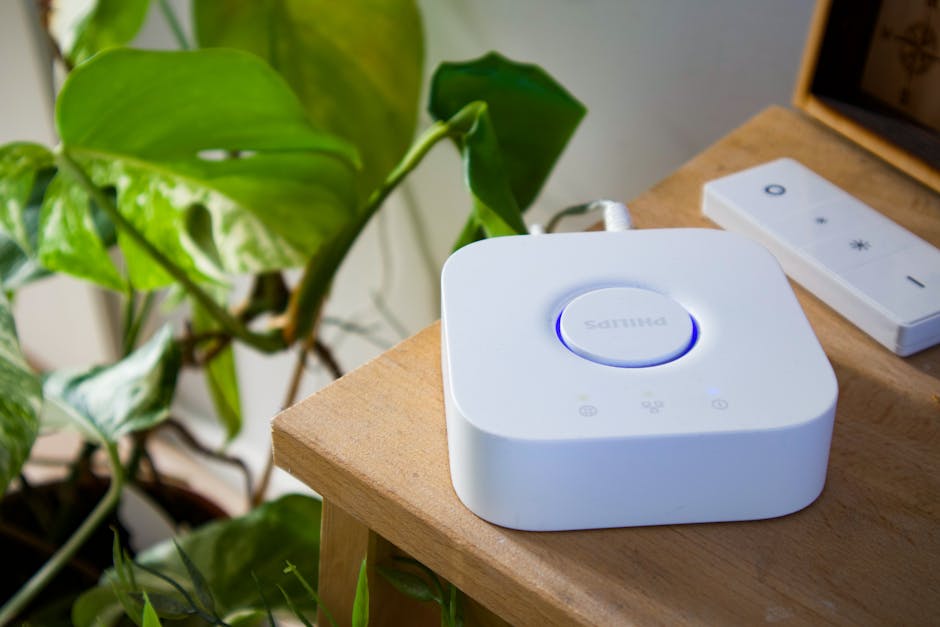
Signify (Philips Hue) Philips Hue White and Colour Ambiance
Bottom line. The right pick if you'll grow into 10+ bulbs over time and want "it just works" reliability. Pay the upfront cost, enjoy the smoothest experience, be done.
Pros
- Best-in-class app and reliability - pre-built scenes look genuinely good
- Zigbee mesh via Hue Bridge gives near-instant response times
- Largest accessory ecosystem (sensors, switches, light strips, outdoor)
- Long-term software support - Hue bulbs from 2018 still get updates
Cons
- Most expensive option by a wide margin - £40-50 RRP per refill bulb
- Hue Bridge required for full functionality - Bluetooth-only mode is limited
- Whole-house setup (10-12 bulbs) lands at £400-£600 at full RRP
Govee Smart Bulbs
Bottom line. Brilliant first taste of smart lighting under £40. Poor base for a 50-bulb setup. Bulbs are cheap enough to retire to spare rooms when you upgrade.
Pros
- Cheapest of the four - a 4-pack runs £30-50, less than one Hue refill
- Wi-Fi based, no hub required - five-minute setup per bulb
- RGBIC range shows multiple colours per bulb - playful effect modes
- Music-reactive and animation features more fun than Hue offers
Cons
- Wi-Fi reliability degrades with bulb count - 10+ bulbs strain older routers
- Govee Home app has been known to log out, lose scenes after router reboot
- Response times noticeably slower than Hue's Zigbee mesh
- HomeKit support is partial and inconsistent across the range
IKEA Dirigera + Tradfri
Bottom line. The smart Matter-first pick for 2026 buyers. The hub costs less than two Hue refill bulbs and won't be stranded by protocol changes.
Pros
- Cheapest hub-based option - Dirigera at ~£55 plus £6-20 per bulb
- Matter-over-Thread support out of the box - most future-proof option
- Mixes with Matter-compatible bulbs from other brands on the same hub
- IKEA Home smart app is straightforward without being feature-shallow
Cons
- App less polished than Hue's - advanced automations need a paired platform
- Tradfri colour bulbs are visibly less vivid than Hue or Govee at full saturation
- IKEA's update cadence is slower - new features arrive months after rivals
TP-Link Kasa / Tapo
Bottom line. The right pick for 1-2 bulbs in a single room or for testing the smart-home idea cheaply. Cheap enough to retire if you outgrow them.
Pros
- Lowest barrier of any system - buy one bulb, scan a code, working in 5 minutes
- No hub, no protocol decision, no ecosystem to commit to
- Reliability better than Govee, not as good as hub-based systems
- Tapo line is cheaper than Kasa for similar capabilities
Cons
- Like Govee, every bulb on your Wi-Fi - scaling slows down past 10-15 bulbs
- No native HomeKit - needs a separate bridge or Home Assistant for Apple
- Kasa and Tapo apps don't reliably mix devices despite being same company
- Scenes and routines are functional but not as polished as Hue or IKEA
Best smart light bulb for absolute beginners
If you want a single bulb to ease into smart lighting - without thinking about hubs, ecosystems, or protocols - the TP-Link Tapo L530E is the right pick. Around £15-20, screws into a standard E27 fitting, and is controllable from the Tapo app within five minutes of unboxing. Tunable white plus colour, dimmable, works with Alexa and Google. No HomeKit, but you almost certainly don’t need it for a single bulb. If you later decide you love it, buy two more before committing to a hub-based system - and if you outgrow Wi-Fi reliability past a dozen bulbs, retire the Tapo bulbs to spare rooms and graduate to Philips Hue or IKEA Dirigera.
First-time smart-bulb buyer's decision tree
Six questions, one answer at the end
If you've never bought a smart bulb before and the four options above are blurring together, walk through these six questions in order. The last question you answer "yes" to is the system you should buy.
Step 1 — Do you only want to try one bulb to see if you like smart lighting at all? Buy a single TP-Link Tapo L530E (around £15-20). Screws into any E27 fitting, app setup in five minutes, no hub. If you don't enjoy it, you've spent less than a takeaway.
Step 2 — Are you confident you want 4-5 bulbs but probably won't grow past 10? Buy a TP-Link Kasa/Tapo 4-pack or a Govee 4-pack (£30-50). Stick with Wi-Fi bulbs — no hub to position, no protocol decision, scales fine to 10-15 bulbs before reliability starts dropping.
Step 3 — Are you in an Apple household and want HomeKit support? Skip Govee and Tapo (partial or no HomeKit). Choose between Philips Hue (best HomeKit experience, premium pricing) or IKEA Dirigera (Matter-over-Thread bridges to HomeKit natively, half the price).
Step 4 — Will you grow into 10+ bulbs over the next 1-2 years? The maths now favours a hub. £40 of Wi-Fi bulbs roughly equals one hub-based bulb plus its share of a Hue bridge — so once you cross five bulbs, the per-bulb premium for a hub system is small.
Step 5 — Do you want the most future-proof system that won't be stranded by protocol changes? Buy IKEA Dirigera. Matter-over-Thread support out of the box means third-party Matter bulbs (and future protocols) drop into the same hub. Half the price of Hue for the starter setup.
Step 6 — Do you want the smoothest experience and the largest accessory ecosystem regardless of cost? Buy Philips Hue. Best app, best reliability, biggest range of sensors/switches/strips/outdoor lights, longest software support track record. Pay the premium, never think about it again.
Still unsure between two systems after walking through the six steps? Default to TP-Link Tapo for one bulb — at £15-20 the cost of being wrong is trivial, and you'll learn more from owning one bulb for a week than from another hour of research.
What actually matters when choosing a smart bulb
1. Does it need a hub? Hub-based bulbs (Philips Hue, IKEA Dirigera, anything Zigbee or Thread) talk to a small box that plugs into your router, and the box talks to your phone. Wi-Fi bulbs (Govee, Kasa, Tapo) skip the hub and join your home Wi-Fi directly. Hubs cost more upfront and are more reliable as you scale. Wi-Fi bulbs are cheaper and easier to start with, but slower and less reliable past 10-15 bulbs.
2. What ecosystem are you in? If you're an Apple household, HomeKit support matters - Hue and IKEA Dirigera have it natively, Govee and Kasa are partial or absent. If you're Alexa or Google, all four work fine. If you're considering Home Assistant, all four are supported via integrations.
3. How many bulbs over how long? One bulb is a different decision than 50. Buy a Wi-Fi bulb if you're staying small. Buy a hub-based system if you'll grow into 10+ over the next year or two. The break-even is roughly £40 of bulbs.
4. Do you actually want colour? Tunable white (warm to daylight) is the more useful smart-bulb feature for most people. Colour is genuinely fun for living rooms and kids' rooms but useless in kitchens, bathrooms, and hallways. Save the colour-bulb budget for the rooms you'll actually enjoy.
Philips Hue in detail
Philips Hue uses Zigbee (a low-power mesh protocol) via the Hue Bridge, which plugs into your router with an Ethernet cable. The bridge runs in the background - set up once, forget. The Hue app is the best in the category by some margin: rooms, scenes, and routines take minutes to configure and the pre-built scenes (warm dimmed evening, bright cool morning, party mode) look genuinely good.
Voice control with Alexa, Google, and Siri all just works. Response times are near-instant - you'll feel the difference compared to Wi-Fi bulbs. Pricing is the trade-off: a Hue starter kit (bridge plus 2-3 colour bulbs) typically runs £130-180, refill colour bulbs £40-50 each. White-only bulbs are cheaper at £15-20 each. For a deeper review, see our Philips Hue Starter Kit review.
Govee in detail
Govee is the polar opposite of Hue: bright, colourful, cheap, Wi-Fi-based, no hub. Most Govee bulbs run on dual-band Wi-Fi and Bluetooth - scan a QR code, the bulb joins your Wi-Fi, controllable via the Govee Home app within minutes. A 4-pack of Govee colour bulbs typically costs £30-50, less than a single Hue colour refill.
Colour rendering is genuinely good, particularly in the higher-end RGBIC range (multiple colours in a single bulb - useful for accent strips and lamps). The Govee Home app has dozens of pre-built scenes, music-reactive modes, and effect animations more playful than anything Hue offers. The trade-offs are Wi-Fi reliability at scale, slower response times, and an app that has been known to log out or lose scenes after a router reboot.
IKEA Dirigera + Tradfri in detail
IKEA's smart-home story has been unusually patient. The original Tradfri range used Zigbee with a small hub. The current Dirigera hub adds Matter-over-Thread support - IKEA bulbs and accessories now plug into the wider Matter ecosystem alongside Apple Home, Apple's smart home ecosystem accessed via the iOS Home app,, Google Home, and Amazon Alexa. For a 2026 beginner who wants something that won't be stranded by a protocol shift, Dirigera is genuinely the most future-proof option.
Bulbs are inexpensive (white-only Tradfri at £6-10, colour around £15-20), the Dirigera hub is around £55, the IKEA Home smart app is straightforward. A hub plus four colour bulbs runs under £100 - half the price of an equivalent Hue setup. The trade-offs: app less polished than Hue's, Tradfri colour bulbs less vivid at full saturation, and IKEA's update cadence is slower. See our Matter explainer if the term is new.
TP-Link Kasa / Tapo in detail
TP-Link's smart-home line splits into Kasa (the original, slightly more premium) and Tapo (newer, cheaper). Both run on Wi-Fi with no hub, both work with Alexa and Google Assistant, both come in dimmable, tunable-white, and colour variants. Pricing sits roughly halfway between Hue and Govee.
Lowest barrier of any system - buy one bulb, scan a code, working in five minutes. No hub to position, no protocol decision, no ecosystem to commit to. Reliability is generally good - better than Govee, not as good as hub-based systems. The trade-offs: Wi-Fi scales poorly past 10-15 bulbs, no native HomeKit (needs a separate bridge), and the Kasa and Tapo apps don't reliably mix devices despite being from the same company.
Which one is right for you?
Want premium quality and 10+ bulbs over time → Philips Hue. Pay the upfront cost, enjoy the smoothest experience, be done.
Want cheap colour bulbs to mess about with → Govee. Don't expect Hue-tier reliability, but for £40 you get more colour-changing fun than any other option.
Want a clean Matter-based setup that won't be stranded → IKEA Dirigera + Tradfri. The hub costs less than two Hue refills, and Matter means you can mix third-party bulbs later.
Want one or two smart bulbs and that's it → TP-Link Kasa or Tapo. No hub, no fuss, works with Alexa and Google. Cheapest path to a single working smart light.
Rule of thumb on hubs: if you'll end up with more than 5 smart bulbs, buy the hub. Below that, don't bother - the break-even is roughly £40 of bulbs.
Frequently asked questions
Q01Do I really need a smart-home hub for smart bulbs?
Q02Will smart bulbs work with my existing dimmer switches?
Q03Can I mix brands?
Q04What's the cheapest way to start?
Q05Is Matter actually useful in 2026?
What to actually buy first
Hue starter (£130-180): Hue Bridge plus a 3-pack of White and Colour Ambiance E27 bulbs. Lounge floor lamp, bedside lamp, kitchen - all the scenes and routines you'll need on day one.
Govee starter (£40): 4-pack of Govee Smart RGBWW colour bulbs. Two for lounge accent lighting, one bedside, one spare. Pre-built scenes give an instant party mode for the cost of a takeaway.
IKEA starter (£100): Dirigera hub plus four Tradfri E27 colour bulbs (or 6-8 white-only). Pick the bulb sizes that match your fittings. Pair with the IKEA Home smart app and link to Apple Home or Google Home if you have those.
Kasa / Tapo starter (£20): single Tapo L530E or Kasa KL135 colour bulb in the lamp you'd most enjoy controlling from your phone.
Tight budget? See smart home on a budget for refurbished bulb tips and starter-pack discounts.