Local-First Smart Home: Privacy Without the Compromise
Which controllers and protocols stay local in 2026, how Matter-over-Thread changes the game, and where the cloud quietly creeps back in.

There's a particular flavour of smart home advice that goes like this: throw out everything cloud-connected, build a home full of Home Assistant + Zigbee + Z-Wave, never use Alexa, never trust Big Tech. It's well-meaning. It's also, for most people, completely impractical.
A local-first smart home doesn't mean a zero-cloud smart home. It means the lights, locks, heating, and sensors you actually rely on keep working when the internet drops - and the data those devices generate doesn't leave your house unless you decide it should. Convenience features that lean on the cloud (voice assistants with proper LLM brains, remote access while you're on holiday, family-shared automations across continents) are fine to keep. The point is that they're an extra layer, not the foundation.
This guide walks through what "local-first" actually means in 2026, which controllers and protocols stay local, where the cloud quietly sneaks back in even on systems that look local on the box, and a recommended starter stack for people who'd rather their light switches not depend on a server farm in Virginia.
What "local-first" actually means
Three things have to be true for a smart home to qualify as local-first:
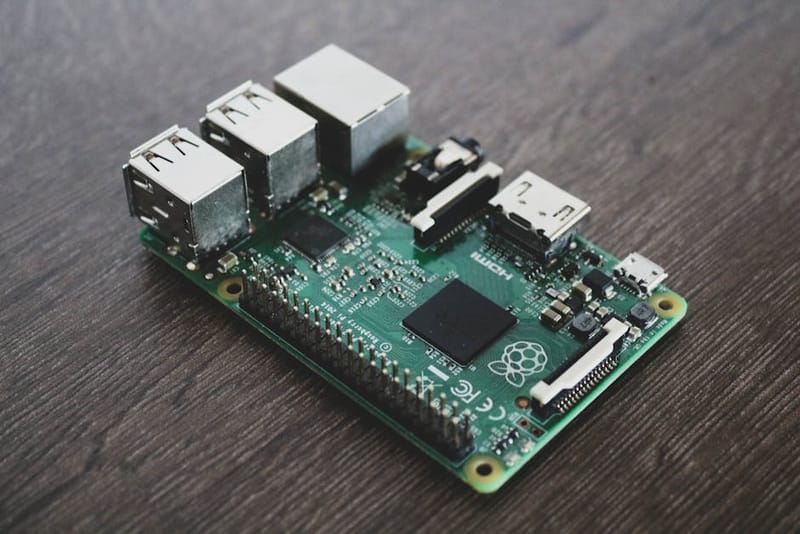
- The controller runs in your house. Not in a vendor's data centre with a thin app pretending to be a control panel. A Raspberry Pi, a mini PC, a HomePod, an Apple TV, a dedicated hub - anything that physically lives within Wi-Fi range of your router.
- The devices can talk to the controller without going via the internet. Either over Zigbee, Z-Wave, Thread, Matter, or LAN.
- The automations run locally. If your front door not unlocking at 6pm depends on a server response from California, you haven't built a local-first home. You've built a remote-controlled house.
Notice what isn't on that list: voice assistants, remote app access, software updates, weather data, calendar integrations. Those can all live in the cloud without compromising the principle. The test is simple - if your broadband router caught fire right now, would your house still function? In a local-first setup, the answer is yes, with maybe a couple of features missing (voice control, geofencing, anything that needs forecast data). That's the bar.
Why bother? The real benefits
Privacy is the headline reason, but it's honestly the least practically interesting one for most households. The real wins are mundane:
Speed. A locally-routed motion sensor → light command runs in 50-150 milliseconds. A cloud-routed one takes 400-1500 ms, sometimes longer. You feel the difference instantly when you walk into a room - local lights feel like a light switch, cloud lights feel like waiting for a slow website.
Reliability when the internet is down. UK broadband has a single point of failure (the master socket) and an average of about 6-12 outages a year for most providers. If your front door, your heating, and your evening lights all depend on a working internet connection, that's an obvious fragility. Local-first means a broadband outage is an annoyance, not a household emergency.
Longevity. Cloud-tied devices are at the vendor's mercy. When a company gets bought, pivots, or just decides a product line isn't worth the support costs, your £200 hub becomes a paperweight. Insteon (2022), Wink (multiple near-deaths), Logitech Harmony, original Revolv hubs, Best Buy Insignia, Lowe's Iris - the graveyard is enormous. Local-first devices keep working long after their vendor has lost interest.
Data ownership. This is the privacy bit, but framed practically: you can run analytics on a year's worth of your own energy use, motion patterns, or door sensor logs, because the data is on your hardware in a queryable format. Cloud-only platforms either don't give you the raw data at all, or hide it behind paid "history" tiers.
No mandatory accounts. Setting up a local Home Assistant install doesn't require an email address, a phone number, or a credit card. Lots of cloud platforms quietly do, and they'll happily lock you out if a billing card expires.
Controllers that stay local
Not every "hub" is a real local controller. Several big-brand smart home hubs route everything via the cloud even when the device next to it is six inches away. Here are the controllers that genuinely run automations on your own hardware:
Home Assistant (the obvious one). Runs on a Raspberry Pi, a mini PC, an old laptop, or a NAS. Open-source, free, enormous integration library. Once installed, it operates entirely offline - voice processing, automations, dashboards, the lot. You'll want our Home Assistant on a Raspberry Pi setup guide if you want the cheapest viable path, or the getting started guide if you're new to the platform. Limitation: more setup work than the alternatives, and a learning curve people either love or quietly resent.
Hubitat Elevation. A dedicated hardware box, £120-150, designed specifically for local control. Less powerful than Home Assistant but considerably less fiddly. Excellent Zigbee and Z-Wave radios out of the box, native Matter and Thread support, and a respectable rule engine. Doesn't need a Raspberry Pi or any tinkering. Best for people who want local-first without the homelab vibes.
Apple Home, Apple's smart home ecosystem accessed via the iOS Home app, with a HomePod or Apple TV. Often missed in local-first conversations because it's a Big Tech product, but Apple Home actually runs locally on a HomePod or Apple TV acting as the "home hub". Automations execute on-device, Matter and Thread are both supported natively, and Apple's privacy posture is genuinely better than the alternatives. The downside is the ecosystem is narrower - fewer devices, less customisation. For households already deep in Apple, this is the path of least friction.
Aqara M3 Hub (in Local Mode). Aqara's flagship hub explicitly supports a "local" mode that runs scenes and routines without internet. Useful as a Zigbee/Thread bridge for an Apple Home or Home Assistant setup, with a fallback automation engine if either fails.
SmartThings hubs of the post-Aeotec generation can run a subset of automations locally, but the platform overall leans cloud-first. Treat it as a Zigbee/Thread bridge rather than a true local controller.
What isn't a local controller: anything Alexa-branded without a separate hub (Echo speakers route through AWS), Google Home, Google's smart home ecosystem and companion app for Nest devices,, Ring, Nest, original Philips Hue setups (the new Hue Bridge does local routines, the old app didn't), any Wi-Fi smart plug that only talks to its phone app via the vendor's cloud.
Protocols that stay local
The protocol your devices use is half the battle. Even with a beautifully local controller, plug in cloud-tethered Wi-Fi devices and you've undone the whole point.
Zigbee. The old reliable. Mesh networking, very low power, devices typically £8-15. Doesn't touch the internet - devices talk to a Zigbee coordinator (built into Home Assistant via a ConBee/Sonoff/SkyConnect dongle, or into Hubitat directly), the coordinator translates to the controller. Slight downside: Zigbee has fragmentation, some devices implement the standard creatively, and battery devices can be sluggish to respond. For a deeper comparison of the wireless standards, see our Z-Wave vs Zigbee vs Matter walkthrough.
Z-Wave. Functionally similar to Zigbee but with stricter certification (so fewer weird edge cases), better range, and fewer cheap devices. Excellent for door locks and major-system devices where reliability matters more than cost. Always local - there's no cloud component in the Z-Wave standard at all.
Thread. The new kid. A low-power mesh similar to Zigbee, but IP-based, which means devices can address each other directly and don't need a separate "bridge" - anything with a Thread Border Router (HomePod Mini, Apple TV 4K, Nest Hub, Echo Hub, dedicated Thread border routers, Home Assistant SkyConnect dongle) becomes part of the mesh. Thread itself is purely local - no cloud - but most Thread devices today are also paired with Matter as their app-layer protocol.
Matter (over Thread). Local. When you commission a Matter device to a Matter controller, the binding lives entirely on your network. Commands flow over Thread directly between the controller and the device. This is the future of local-first smart home, and the main reason it's gone from "obsessive hobby" to "realistic mainstream option" in the last two years.
Matter (over Wi-Fi). Also local - once commissioned, Matter-over-Wi-Fi devices talk to your controller via your home network without round-tripping the cloud. The catch: the device manufacturer's companion app might still cloud-route. Setup typically happens through that app, which can scoop up account data even though the day-to-day operation is local.
LAN-only Wi-Fi (ESPHome, Shelly, Tasmota, some Sonoff). These talk to your controller exclusively over your local network. ESPHome (the firmware) is the gold standard - open-source, no vendor backend at all, devices announce themselves to Home Assistant and run scripted automations locally. Shelly devices ship with cloud features but can be configured to operate LAN-only.
MQTT. Not a device protocol, but worth knowing. MQTT is a local-network messaging bus that lots of smart-home gear can speak to (especially ESPHome devices, Shelly, and Zigbee2MQTT setups). Useful for plumbing multiple ecosystems into one Home Assistant install. Entirely local.
Where the cloud sneaks back in
Even with a properly local stack, there are a handful of places the cloud quietly creeps back in. Most are fine; a few are worth knowing about.
Remote access. If you want to control your house from your phone when you're not on the home Wi-Fi, you need some connection from outside in. Home Assistant offers two options: Nabu Casa Cloud (a £6.50/month subscription that handles the public endpoint securely), or a self-hosted reverse proxy/VPN setup. Apple Home does this via your iCloud account. Both options keep the day-to-day local but use the cloud as a connection broker. Reasonable trade-off.
Voice assistants. Standard Alexa, Google Assistant, and Siri all process voice in the cloud. You can switch to a local voice setup - Home Assistant Voice Preview Edition, an Atom Echo, or Rhasspy/Wyoming Whisper running on a Pi - but expect to lose some natural-language understanding. The 2025 Alexa+ (with the bigger LLM-grade brain) and Apple Intelligence's Siri are both cloud-only. Pragmatic compromise: keep voice cloud-routed, but ensure the underlying automation fires locally regardless.
Vendor companion apps. This is the sneakiest one. A Matter-certified Wi-Fi bulb might run locally day-to-day, but the manufacturer's app still talks to their cloud for firmware updates, telemetry, and product registration. If the company goes bust, the device often keeps working because Matter is open, but firmware updates dry up. Tolerable for most devices, less ideal for security gear (cameras, locks).
Weather, calendars, news. All cloud sources by nature. Automations that depend on them (heat the bathroom if frost is forecast) need internet. The graceful workaround is to design automations so a missing data point fails safely - e.g. if weather data is missing, fall back to a temperature schedule rather than the forecast trigger.
Energy tariff data. Specific to UK households on Agile Octopus, Economy 7, EV-specific tariffs, or anything with time-of-use pricing. The tariff API is cloud, but the automations can still be local - fetch the next 24 hours of prices once a day, store them on your controller, and run schedules off the cached data. We cover this in more detail on our sister site evtariff.co.uk.
A starter local-first stack
If you're building from scratch and want a sensible local-first foundation that won't require six months of tinkering, here's a stack that works:
Controller: Home Assistant Green (£99, plug-and-play hardware that comes with HA pre-installed) or Hubitat Elevation (£140, similar idea but a tighter ecosystem). Either is a one-cable setup - power, ethernet, done. If you're already comfortable with a Pi, a Raspberry Pi 4 build works out about £80-100 and gives you more flexibility.
Radio coverage: Add a single SkyConnect or ConBee II USB stick to your controller. This gives you Zigbee + Thread on the same dongle. For Z-Wave devices (mainly locks), add an Aeotec Z-Stick or use Z-Wave JS UI. Most starter homes can get by with Zigbee + Thread.
Thread border router(s): If you've got a HomePod Mini, Apple TV 4K, or Nest Hub, you've already got one. Otherwise, the Home Assistant SkyConnect stick acts as one for the HA stack.
Lights: A handful of Zigbee bulbs (Innr, Philips Hue, IKEA Tradfri - all happy on a non-Hue coordinator) plus a couple of Aqara or Sonoff smart plugs for lamps you don't want to swap.
Sensors: Aqara motion + temperature + door sensors. Zigbee, £10-15 each, decent battery life, no vendor account needed.
Switches: Shelly Plus 1 or 2PM behind your existing wall switches. They preserve the physical switch (important for cohabiting households) and operate over LAN. Configure them in LAN-only mode if you don't need the Shelly cloud features.
Climate: Smart thermostat with an open API (Tado, Drayton Wiser, ESPHome-flashed Honeywell, or a Z-Wave thermostat) - avoid Hive and Nest unless you specifically want the cloud features.
Door locks: Z-Wave or Matter-over-Thread locks. Yale, Aqara, Schlage all have models that work. Avoid Wi-Fi-only smart locks - most of them are critically internet-dependent.
Voice (optional): Start with whatever phone you already have for voice commands, set up a couple of starter Home Assistant automations, and only add a dedicated voice device once you've decided whether you want cloud (Alexa/Google) or local (HA Voice Preview Edition).
The pragmatic compromise
Worth saying out loud: local-first isn't a moral position, it's a practical preference. Cloud-tied devices aren't evil, they're just a different trade-off. Plenty of people happily run Nest thermostats, Ring doorbells, and Alexa speakers, and never miss the local control because their internet is reliable and they've decided the data exhaust is acceptable.
The useful framing isn't local-vs-cloud as a binary, it's which features can I afford to lose if the internet drops?
- Lights: intolerable to lose. Must be local.
- Heating in winter: intolerable to lose. Must be local.
- Front door lock: absolutely must work locally.
- Door/window sensors used for security automations: must be local.
- Doorbell push notifications when away: by definition cloud, no way round it.
- Voice commands: annoying but not critical to lose for an hour.
- Remote-app control while at the supermarket: nice but optional.
If your foundation (lights, locks, heating, sensors) is local and your conveniences (voice, remote access, push notifications) are cloud-augmented, you've got the right setup. The mistake people make is the opposite: a fully cloud-tethered foundation, where a flaky broadband connection genuinely affects their ability to live in their own house. That's the failure mode worth avoiding.
Common mistakes
Mistakes I see new local-first builders make, more or less in descending order of regret:
Buying cheap no-brand Wi-Fi devices first. Tuya/Smart Life-rebadged products dominate Amazon and look like a bargain. Most are cloud-only, with closed APIs, no Matter support, and a high chance of becoming bricks if the original vendor pulls their backend. The £8 saved up front becomes £25 wasted later when you replace them. Start with Matter, Zigbee, Z-Wave, or LAN-firmware-friendly Wi-Fi (Shelly, ESPHome).
Not buying a powerful enough controller. Home Assistant on a Pi 3 with a small SD card works for a week, then groans under integrations and history retention. Pi 4 with 4GB minimum, ideally Pi 5 or a small Intel N100 mini-PC. The £20-40 extra at the controller is the cheapest performance upgrade you'll ever make.
Mixing too many coordinators. Trying to run Zigbee2MQTT, ZHA, Hubitat, and SmartThings simultaneously on the same hardware. Pick one Zigbee/Thread coordinator per controller. Devices can't be paired to two coordinators at once - Zigbee is exclusive.
Skipping the backup story. A local-first home is brilliant until the SD card on the Pi dies, which it absolutely will eventually. Snapshot your Home Assistant config weekly to a USB drive, a NAS, or a remote object store. Three minutes to set up, saves a month of rebuilding.
Putting smart switches in front of smart bulbs. A common new-builder error. If you wire a Zigbee smart switch upstream of Zigbee smart bulbs, cutting power kills the mesh node and the bulb's intelligence. Either use dumb bulbs with smart switches, or smart bulbs with no upstream switch (just permanent power).
Does going local-first mean giving up Alexa or Google Home?
Is Apple Home properly local?
Will my smart home work if my Home Assistant box dies?
Is Matter actually ready for a local-first setup yet?
Do I need a VPN to access my smart home remotely?
What's the cheapest viable local-first starter setup?
Where to go next
Once you've got a local-first foundation running, the natural next steps are:
- Set up your first batch of automations to actually use the platform - local control without automations is just a more expensive way to flick switches.
- Tidy up the dashboard with our no-YAML Home Assistant dashboard guide - your future self will thank you when you can find things.
- Avoid the classic smart home beginner mistakes - most of which apply doubly when you're trying to keep things local.
- If you're still deciding which platform fits your household, our smart home platforms comparison is the head-to-head between Apple Home, Google Home, Alexa, and Home Assistant.
Local-first is one of those decisions you only really appreciate the third or fourth time the broadband goes down and the lights still work. Boring, in the best possible way.
Build a smart home that lasts
Explore the rest of our Smart Home 101 series - beginner-friendly guides on Home Assistant, Matter, automations, and avoiding the rookie mistakes.